
🎨 Text Selection Color Blue থেকে Pink করার সঠিক উপায় (WordPress + Elementor)
অনেক সময় ক্লায়েন্ট বলে থাকেন
“Please add favicon text selection color is blue now, please make pink”
আসলে এখানে favicon না, বোঝানো হচ্ছে 👉 Text Selection Color
মানে—
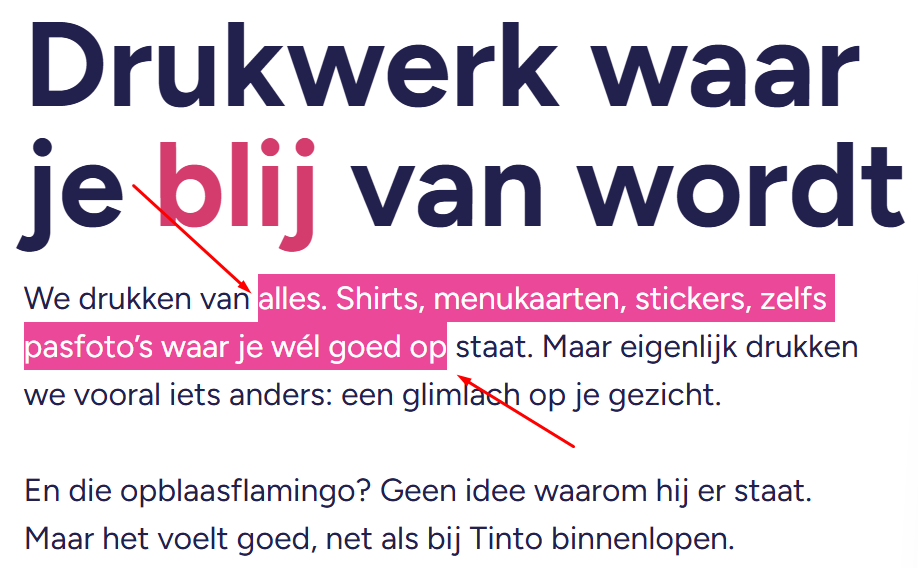
User যখন mouse দিয়ে লেখা select করে, তখন যে highlight color দেখা যায়।
ডিফল্টভাবে এটি blue হয়, কিন্তু brand identity ঠিক রাখতে আমরা এটাকে pink করতে চাই।
🔍 Text Selection Color কীভাবে কাজ করে?
User যখন নিচের ছবির মতো করে লেখা select করে 👇
(যেমন “alles. Shirts, menukaarten…” অংশ)
👉 Browser তখন ::selection pseudo-element ব্যবহার করে
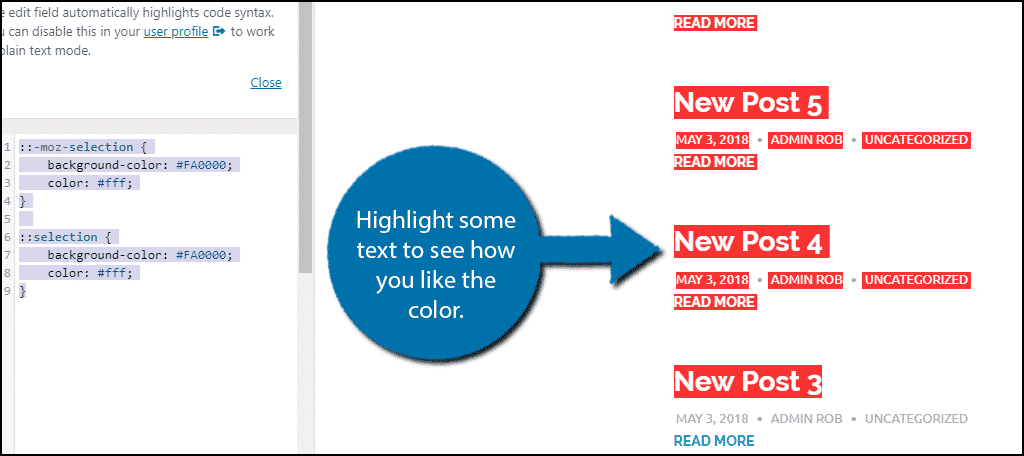
👉 CSS দিয়ে আমরা এর color override করতে পারি
✅ CSS Solution (Global – পুরো site-এ কাজ করবে)
::selection {
  background: #EC4899;
  color: #FFFFFF;
}
🔹 background → selection highlight color
🔹 color → selected text color
এই কোড দিলে পুরো website-এ blue selection → pink হয়ে যাবে।
🧩 Elementor Free ব্যবহার করলে কীভাবে দিবেন?
Elementor Free ব্যবহার করলে নিচের পদ্ধতিটাই best 👇
Steps:
- WordPress Dashboard → Appearance
- Customize এ যান
- Additional CSS ক্লিক করুন
- CSS কোড paste করুন
- Publish
✔ Done! এখন blog সহ পুরো site-এ pink selection কাজ করবে।
🧩 Elementor Pro ব্যবহার করলে (Advanced Control)
🔹 Globalভাবে চাইলে:
- Elementor → Site Settings → Custom CSS
- CSS paste করুন
🔹 শুধু Blog Page-এর জন্য চাইলে:
.single-post ::selection {
  background: #EC4899;
  color: #FFFFFF;
}
👉 এতে শুধু blog post page-এ effect হবে
👉 Homepage বা অন্য page-এ কোনো প্রভাব পড়বে না
📈 SEO & UX কেন গুরুত্বপূর্ণ?
✔ Brand color consistent থাকে
✔ UI আরও polished দেখায়
✔ Default browser behavior থেকে আলাদা হয়
✔ User experience subtly improve করে
ছোট detail → বড় professional impact 🚀
🌍 English Version (SEO-Friendly)
Change Text Selection Color from Blue to Pink (WordPress & Elementor)
By default, when users select text on a website, browsers apply a blue highlight color.
However, for branding and better UI consistency, this color can be customized.
Many clients mistakenly call this “favicon selection color”, but technically it is called Text Selection Color.
CSS Solution (Global)
::selection {
  background: #EC4899;
  color: #FFFFFF;
}
This CSS will apply a pink highlight to all selected text across the website.
Elementor Free Method
- Go to Appearance → Customize → Additional CSS
- Paste the code
- Publish
Elementor Pro Method
- Use Site Settings → Custom CSS for global use
- Or target blog posts only:
.single-post ::selection {
  background: #EC4899;
  color: #FFFFFF;
}